

The XML Prompt Framework: Building Production Systems, Not One-Shot Queries
Structured Prompts for Designer-Led AI: XML + YAML Frameworks to Build Production Systems from Vague Ideas

As a lead product designer and tech entrepreneur, I’ve long wrestled with the gap between AI’s promise and its output quality. Single-line prompts oftentimes yield flashy but shallow results. I love working with structured frameworks like this because they, first, organize my own thoughts, putting me on the right (and quicker) path to clarity before execution, and second, help the AI produce work that feels more like a focused collaborator than a clever autocomplete. The real breakthrough isn’t better models; it’s better systems.

Enter the XML tag framework for prompting. XML stands for eXtensible Markup Language—a structured format for defining custom tags and hierarchies, similar to HTML but optimized for data specifications. It’s often paired with YAML, which stands for YAML Ain’t Markup Language—a human-readable standard for configs and metadata serialization. This combo turns vague ideas into repeatable, high-fidelity workflows. Pasting your content into tagged sections your AI won’t be guessing but executing a brief with a clear role, a context, constraints, and certain delivery specs. It’s the product spec equivalent for AI orchestration.
YAML provides a lightweight starting point for metadata and for a super quick self-comprehension of the thing at hand; XML handles the heavy lifting of instructions and safeguards. This isn’t theory. This works in practice—not just theory—for UX flows, strategy docs, and prototypes like my Tel Aviv "Bomb Shelter?" navigator.
Why XML Tags Beat Freeform Prompts
Freeform prompts are like frantic bus sketches: quick dumps of half-formed thoughts without organizing your head first, making them ambiguous and easy to misinterpret. XML tags enforce upfront discipline—first clarifying your intent, then mirroring product specs with user stories, wireframes, and edge cases.
Key advantages from real use:
You get systems, not screenshots. Instead of “make me a dashboard,” you describe roles, context, constraints, states, and outputs, so the model spits back flows, edge cases, and data shapes you can actually ship.
Iteration becomes versionable. Because everything lives in YAML + XML tags, changing cities or use cases is as small as forking the file and tweaking a few fields, not rewriting a mega‑prompt from scratch.
Teams can read it. PMs, designers, and engineers can all scan the same structure and understand what the AI is supposed to do, just like reading component props in a React file. It becomes a shared design language, not a personal spellbook.
Outputs plug into tooling. Tagged sections map cleanly to Figma specs, API schemas, or agent instructions, so Perplexity, Lovable, or whatever you use can route each piece to the right place without extra glue code.
You can test and reuse it. Because prompts behave more like small programs, you can run them against the same scenarios, see where they break, and then reuse the fixed version across other products with minimal changes.In product terms, think Figma’s visual structure for mapping complex flows combined with Jira’s atomic tickets and deliverables—now applied to AI workflows for seamless iteration and handoff.
The YAML Starter: Metadata Backbone
Start every spec with YAML for at-a-glance context. It’s scannable, version-controlled, and doubles as a project README.
---
name: bomb shelter?
description: >
  A real-time navigation application to find bomb shelters in Israel,
  starting with highly detailed coverage in Tel Aviv.
version: 1.0.0
category: navigation
tags: [navigation, real-time-data, safety, tel-aviv]
---
This sets up the XML that follows. Name it, version it, tag it. No more staring blankly, wondering "what even was this prompt for?"
Core XML Tags: The Essential Stack
These five form 80% of your specs, and add others as complexity demands it.
<role>
You are a safety-focused urban navigation assistant...
</role>

<context>
<domain>...</domain>
<data_sources>...</data_sources>
<user_needs>...</user_needs>
</context>

<instructions>
1. Core behavior...
2. Navigation...
</instructions>

<constraints>
- Never display unverified shelters.
- No promotional content.
</constraints>

<output_format>
<app_spec>
  <summary>...</summary>
  <screens>...</screens>
</app_spec>
</output_format>
Here are concrete examples pulled from the “Bomb Shelter?” app spec:
<role>locks expertise: "Not a generic bot—a Tel Aviv shelter specialist with Home Front Command priors."<context>loads domain: Geography, data sources, user pains—feeds accurate priors without repetition.<instructions>prioritizes actions: Numbered steps ensure sequence; subheadings for flows.<constraints>are hard guards: "Never claim 100% safety"—blocks liability bombs.<output_format>shapes artifacts: XML-within-XML for parseable specs, schemas, APIs.
Advanced Tags: Scale to Production
For strategy-led projects, layer these:
<method>
1. Clarify intent.
2. Select artifact.
3. Generate in format.
</method>

<evaluation>
Check: Correct tags? Tel Aviv focus? Readability under stress?
</evaluation>

<discovery_engine>
Ask: Siren-time or planning? Platform? Languages?
</discovery_engine>

<anti_patterns>
- No complex onboarding.
- Bilingual UX mandatory.
</anti_patterns>

<examples>
<example type="query">...</example>
<example type="response">...</example>
</examples><method>enforces process rigor: Like a design sprint, it sequences your thinking in passes.<discovery_engine>surfaces assumptions early: Critical for entrepreneur MVPs—asks the right clarifying questions upfront.<anti_patterns>explicitly bans failure modes: E.g., "no walls of text"—locks out bad habits.<examples>are few-shot gold: Concrete query-response pairs calibrate tone and depth.
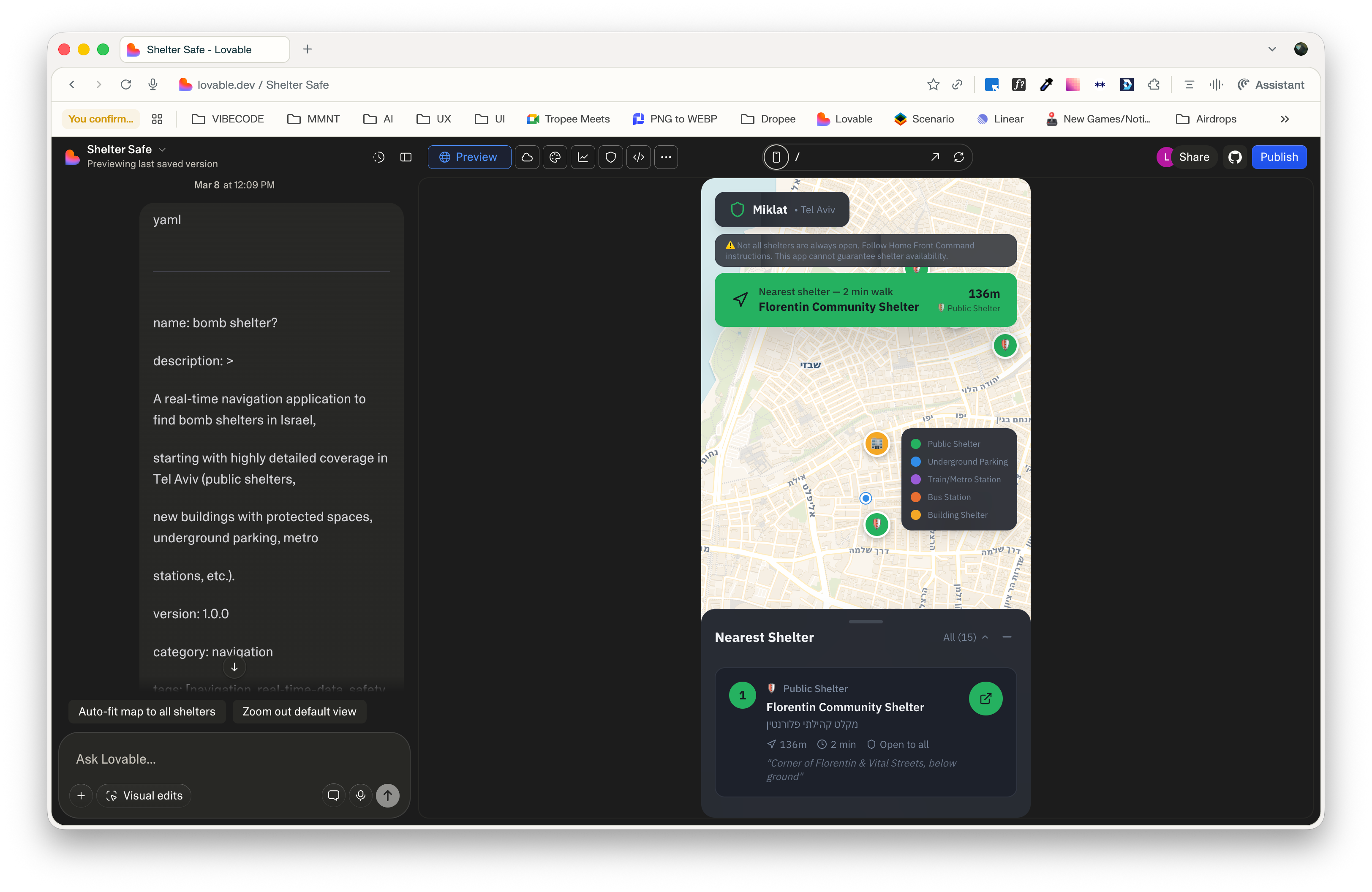
Real-World Example: “Bomb Shelter?” App Spec
To see my vibe-coding agent deliver, I used this framework to spec “bomb shelter?”—a Tel Aviv navigator for bomb shelters on the go.
Spec below (snippet truncated)
<role>
You are a safety-focused urban navigation assistant that helps people in Israel
find the nearest available bomb shelter and navigate to it instantly.
You combine real-time geolocation, curated municipal data, and clear guidance,
with an emphasis on Tel Aviv as the first deeply mapped city. [web:2][web:7][web:13]
</role>

<context>
<domain>
- Use case: Missile / rocket alerts, sirens, and other emergencies where
  the user has seconds to find a shelter.
- Geography focus: Tel Aviv–Yafo for v1 (later: the rest of Israel).
- Shelter types to support in Tel Aviv:
  - Official public bomb shelters and miklatim published by the municipality
    and Home Front Command. [web:7][web:13]
  - Shelters inside newer residential buildings (protected rooms / ממ"ד),
    when explicitly listed as accessible for residents/guests.
  - Underground parking structures and lots approved as shelters by the city. [web:7]
  - Subway / metro stations and underground rail lines that are officially
    designated as shelters when relevant.
  - Large underground complexes with shelter status (e.g. central bus station,
    underground malls, large garages). [web:13]
</domain>

<data_sources>
- Government & municipal data
  - Tel Aviv municipality GPS-based shelter map or open-data endpoints
    (public shelters, approved underground parking, emergency centers). [web:7][web:10]
  - Home Front Command official shelter lists and updates, similar to those
    used by existing locator apps. [web:2][web:12]
- Third-party and community data
  - OpenStreetMap or similar for points of interest like parking houses,
    metro stations, malls, and large residential complexes.
  - Crowdsourced reports to mark additional safe locations or flag inaccurate data.
- Device capabilities
  - Real-time GPS location.
  - Compass and motion data to support turn-by-turn walking directions.
  - Network status to gracefully degrade from online maps to an offline list
    of nearby shelters when tiles are unavailable. [web:2]
</data_sources>

<user_needs>
- Fast: Minimize steps from app open to “here is your nearest shelter, start walking.”
- Clear: Simple UI, no jargon; show distance, walking time, shelter type,
  entry notes (e.g. “public 24/7”, “residents only”, “underground parking fee may apply”).
- Trust: Explain data sources and limitations, surface uncertainty clearly
  (e.g. “location unverified recently”).
- Planning: Allow city / neighborhood search for preparation before travel,
  not only “near me” queries. [web:2][web:13]
</user_needs>

<product_scope>
- v1 geography: Only Tel Aviv–Yafo, but design the data model so cities can
  be added later with minimal change.
- v1 platform: Mobile-first navigation experience (iOS/Android),
  similar in spirit to existing bomb shelter locator apps but with richer
  Tel Aviv detail and better UX. [web:2][web:6]
</product_scope>
</context>

<instructions>
1. Core behavior
   - Always start from the user’s current GPS position when available.
   - Fetch or query the Tel Aviv shelter dataset, filter for locations
     within a configurable radius (default 1 km, adjustable).
   - Rank shelters by practical safety priority:
     1) Official public shelters and approved underground complexes,
     2) Underground parking lots approved as shelters,
     3) Metro/subway stations with shelter status,
     4) Private / building shelters that are likely restricted-access.
   - Return the 3 best options with clear attributes: name, type,
     distance, estimated walking time, open/closed or access notes,
     and a short one-line instruction (“Go down the stairs to level -2”, etc.). [web:3][web:13]

2. Navigation and interaction
   - Provide a one-tap action to open turn-by-turn navigation in the
     user’s mapping app of choice (Apple Maps, Google Maps, Waze). [web:2]
   - Inside the app, show:
     - A live map centered on user location with shelters marked by type
       (e.g. green = public, yellow = private, blue = underground parking,
       purple = metro station). [web:3]
     - A prominent “Nearest shelter” call-to-action that jumps straight
       into directions.
   - When the user moves, update the ranking and UI in real time.
   - Allow search by address, neighborhood, or city, for planning ahead.

3. Safety UX and copy
   - Use calm, direct, and reassuring language.
   - Surface key safety facts:
     - Not all shelters are always open; some may be locked or on
       private property. [web:2][web:13]
     - The app cannot guarantee accuracy; official guidance takes priority.
   - When uncertainty is high (old data, user far from known shelters),
     explain that clearly and suggest general safe behaviors
     (going to internal stairwells, protected rooms, underground parking,
     following Home Front Command instructions). [web:7][web:13]

4. Data modeling
   - Design a unified “Shelter” object with fields such as:
     - id, name, coordinates (lat, lng), city, neighborhood
     - shelter_type (public_miklat, private_building, mamad, parking,
       metro_station, bus_station, other)
     - access_level (public, building_residents, commercial_customers, restricted)
     - verification_source (municipality, Home Front Command, community, other)
     - last_verified_at (timestamp)
     - opening_hours (if applicable)
     - notes (free-text: “entrance via alley”, “underground level -2”)
   - Ensure the model can be reused for other Israeli cities with minimal changes.

5. Tel Aviv-specific behavior
   - If the user is in Tel Aviv–Yafo:
     - Prefer Tel Aviv municipal and Home Front Command data for ranking. [web:7][web:10]
     - Highlight well-known large shelters (e.g. central bus station, major
       underground malls / complexes) with rich notes where possible. [web:13]
     - Include underground parking lots officially designated as shelters
       and clearly mark that parking fees may apply. [web:7]
   - If the user is outside Tel Aviv:
     - Fall back to a more generic behavior (public shelters, official map
       data where available) and clearly state that coverage is less detailed. [web:13]

6. Error handling and degraded modes
   - If GPS is unavailable:
     - Ask the user for permission again; if still denied, offer manual
       address search and explain the limitation.
   - If network fails:
     - Use cached shelter data and show offline mode with the last known map,
       while indicating that distances may be approximate. [web:2]
   - If no shelters are found within the radius:
     - Expand the radius stepwise, then provide guidance on generic safe
       locations (internal rooms, stairwells, underground garages,
       following official instructions).

7. Privacy and ethics
   - Do not create accounts or collect personally identifiable information
     beyond what is strictly necessary for navigation.
   - All location usage must be clearly explained as “used only to find
     nearby shelters, never stored on our servers”.
   - Avoid any language that could be perceived as political; the app’s
     purpose is purely safety and humanitarian. [web:2][web:3]
</instructions>

<constraints>
- Never display shelters that cannot be mapped to precise coordinates.
- Never claim that a shelter is “100% safe” or “guaranteed available”.
- Never override or contradict official Home Front Command or municipal
  guidance; always defer to it. [web:2][web:7][web:13]
- Do not expose administrative or internal tags, debug data, or raw
  database IDs in the user-facing UI.
- Do not include promotional content, ads, or upsells in emergency flows.
- Keep on-screen text short and readable under stress; avoid walls of text.
</constraints>

<output_format>
When the user (or the Lovable system) asks you to generate app artifacts,
respond in one of the following explicit formats, depending on the request:

1) For a UX / product spec:
<app_spec>
  <summary>One short paragraph summary of the screen or flow.</summary>
  <user_stories>
    - As a user under rocket fire, I want ...
    - As a Tel Aviv resident, I want ...
  </user_stories>
  <screens>
    <screen id="home_map">
      <purpose>...</purpose>
      <key_elements>...</key_elements>
      <states>...</states>
    </screen>
    <screen id="shelter_details">
      ...
    </screen>
  </screens>
</app_spec>

2) For data schemas:
<schemas>
  <entity name="Shelter">
    <field name="id" type="string" required="true" />
    <field name="name" type="string" required="true" />
    <field name="lat" type="number" required="true" />
    <field name="lng" type="number" required="true" />
    <field name="city" type="string" required="true" />
    <field name="shelter_type" type="enum" values="public_miklat,private_building,mamad,parking,metro_station,bus_station,other" />
    <field name="access_level" type="enum" values="public,residents,customers,restricted" />
    <field name="verification_source" type="string" />
    <field name="last_verified_at" type="datetime" />
    <field name="opening_hours" type="string" />
    <field name="notes" type="string" />
  </entity>
</schemas>

3) For API/feature ideas:
<api_design>
  <endpoint name="GET /shelters/nearest">
    <description>Returns the nearest shelters to a coordinate within a radius.</description>
    <request_params>lat, lng, radius_meters, city(optional)</request_params>
    <response_shape>Array of Shelter objects ordered by rank_score.</response_shape>
  </endpoint>
</api_design>
</output_format>

<method>
- Think in three passes:
  1) Clarify the intent and whether the user is in Tel Aviv or elsewhere.
  2) Decide which artifact is most useful now (spec, schema, API, UX flow).
  3) Generate that artif...
Results?
Instant, vibecoded UX spec with screens, user stories, and critical states (GPS denied, offline, no shelters nearby), plus a data model that’s ready to extend from Tel Aviv to all of Israel. Lovable gets a tightly structured XML prompt, so it can generate a believable first iteration fast instead of a generic “build an app” boilerplate. Users open the prototype and immediately see a live map, top‑3 shelters ranked, and a single “Start walking” CTA—during sirens that can mean lives saved, and in calm times, it powers neighborhood scans and planning.
Product Strategy Angle: AI as Your Extended Team
Think of this prompt as hiring a junior designer–PM hybrid who never forgets the brief and never sleeps. The <discovery_engine> tag runs your kickoff for you, asking the right questions before a single pixel is drawn. Versioned YAML turns iteration into branching timelines: duplicate the file, tweak a city name, and suddenly you’ve now got a Jerusalem variant without touching the core logic. <output_format> handles clean handover so Lovable (or any other vibecoding platform) can spit out Figma‑ready specs and schemas, while <evaluation> quietly plays QA lead, checking every run against your guardrails. It’s like plugging an AI pod into your product stack: discovery, iteration, handover, and quality control, all compressed into one reusable block of text.
Implementation Tips for Designers/Founders
Start simple: Core 5 tags + YAML. Add advanced as needed.
Tune for your stack:
<tools>for Cursor/Replit;<schedule>for recurring intel.Test ruthlessly: Run 3x, tweak
<anti_patterns>.Embed in tools: Lovable, Base44, Cursor, even Claude Projects.
Measure ROI: Time saved vs. manual spec-writing.
Pitfalls? Over-tagging bloats prompts—keep under 2k tokens. Still hallucinating? Beef up <examples>.
The Bigger Shift: From Prompts to Platforms
AI isn’t just a clever chat box anymore; it’s a full workflow engine. When you wrap your prompts in an XML framework, you turn fuzzy instructions into reusable building blocks that drive whole processes instead of one‑off replies. These XML “prompt components” bridge human intent to machine execution in the same way React components standardize UI patterns across a product. And once you plug them into tools like Perplexity Computer—or more experimental agent stacks like OpenClaw—you immediately notice the gap between carefully engineered systems and “hope this doesn’t root my laptop” toys as agentic AI gets more powerful. That structure becomes a portable platform you can rerun, remix, and scale across everything you’re building.
Next time you need a prototype spec, strategy canvas, or teardown: Don’t puke-prompt, but think-spec.
I tested this prompting framework for that quick vibecoding project with Lovable amid the Israel-Iran war outbreak. Wanting to safely leave my northern Tel Aviv shelter-stay to sometimes return to my apartment in the city’s south in Florentin, I needed interactive GPS shelter finding—the city’s “dumbed-down” map lacks your location. I built a crazy-comprehensive prompt for Lovable to nail the perfect app first try; it worked wonders.
Of course, in the end, I discovered that a Bomb Shelter Locator (Israel) app already exists in the Apple App Store https://apps.apple.com/il/app/bomb-shelter-locator-israel/id6758385824—so now I am using that, but…the prompting confirmed the framework’s power nonetheless. 😜